IBM i Licensing settings
The VM Licenses tab displays editable information about the optional licesnse for the current VMs.
You can change most IBM i license options only when the VM is shut down.
IBM i Licensing
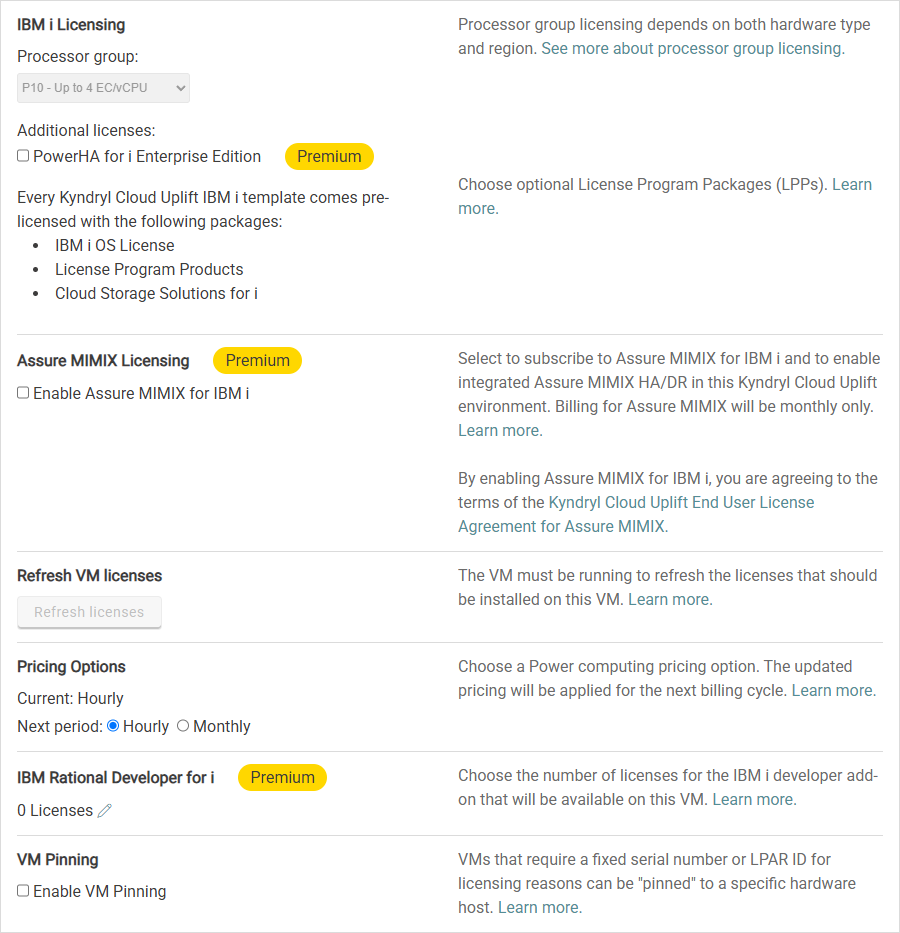
Processor group
Choose the Processor group for your IBM i VM.
Notes
- Processor Type depends on region and processor group and determines the list of available Guest OS choices.
- If Processor group and Guest OS aren't correctly set, the VM may fail to start correctly.
PowerHA for Enterprise Edition
Optional HA package for IBM i. For details, see IBM PowerHA.
Assure MIMIX™ Software Licensing
Enable Assure MIMIX™ Software for IBM i. For detailed installation instructions see Overview of Assure MIMIX™ Software on Kyndryl Cloud Uplift VMs.
Refresh VM licenses
Kyndryl Cloud Uplift automatically refreshes IBM i licenses when you start an IBM i VM. If the licenses are not automatically updated, you can manually refresh the license for an IBM i VM.
To manually refresh licenses for an IBM i VM
- Navigate to the VM Settings > Licenses page.
-
Under Refresh VM licenses, click Refresh licenses.
Notes
- The VM must be running to refresh licenses.
- If IBM i license installation doesn't work correctly, you may need to apply PTFs to your IBM i VM.
Pricing Options
You can choose from the following pricing options:
- Hourly – IBM i usage is billed at an hourly rate. Use this model for as-needed VMs. The default setting for pricing is Hourly.
- Monthly – IBM i usage is billed at a flat monthly rate. Use this model for continuous-use VMs, such as production or automated testing.
Notes
- If you change the pricing for a VM that has been powered on during the billing cycle, the pricing for that VM won't be changed until the next billing cycle.
- IBM i pricing is dependent on the number of vCPUs.
IBM Rational Development for i
Optional Rational Development package for IBM i. Click  to choose the number of Rational Development licenses for this VM. For details, see IBM Rational Development for i.
IBM Rational Development for i licenses are billed for cumulative peak usage during the billing cycle.
VM Pinning
Kyndryl Cloud Uplift administrators can pin a VM to a specific host serial number and LPAR ID. For details, see VM Pinning