#
The Kyndryl Cloud Uplift Automation Pack for IBM UrbanCode Deploy provides a set of pre-packaged actions for provisioning Kyndryl Cloud Uplift environments in an IBM UrbanCode Deploy workflow.
Contents
Throughout the Kyndryl Cloud Uplift Automation Pack for IBM UrbanCode Deploy, sharing portals are called published URLs.
Download and install the Kyndryl Cloud Uplift Automation Pack for IBM UrbanCode Deploy
- Download the automation pack from the Skytap GitHub page.
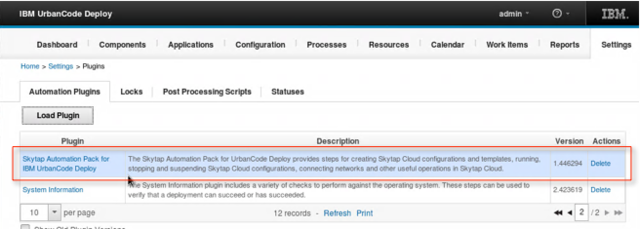
- In UrbanCode Deploy, click Settings > Automation Plugins.
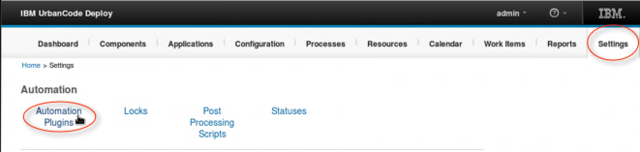
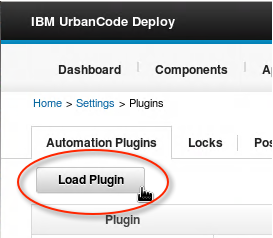
- Click Load Plugin.
-
Browse to the automation pack you downloaded earlier, and click Submit.
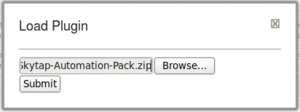
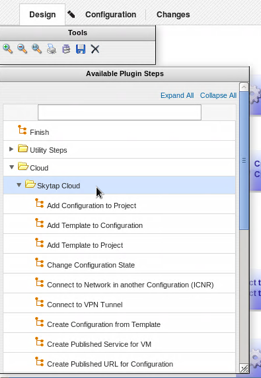
After it’s loaded, the Kyndryl Cloud Uplift Automation Pack for IBM UrbanCode Deploy is displayed in the list of Automation Plugins. Kyndryl Cloud Uplift actions is available in the Available Plugin Steps panel in IBM UrbanCode Deploy process design pages.
Using Kyndryl Cloud Uplift Action Steps
Once you’ve installed the automation pack, you can add Kyndryl Cloud Uplift action steps to your workflow. Each step requires some inputs, which are described in more detail below. Some steps may also produce outputs that can be used as inputs in later steps. These are also described below.
Kyndryl Cloud Uplift authentication
The Kyndryl Cloud Uplift authentication step ensures that all later Kyndryl Cloud Uplift action steps are authenticated and integrated with your Kyndryl Cloud Uplift account.
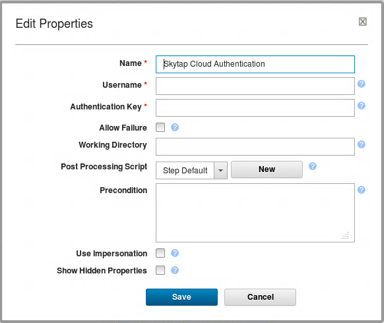
| Input property | Description |
|---|---|
| Username | Your Kyndryl Cloud Uplift user name. |
| Authentication key | Your Kyndryl Cloud Uplift API token. See Finding your user name and API security token. |
| Output property | Description |
|---|---|
| Username | Your Kyndryl Cloud Uplift user name |
| Authentication Key | Your Kyndryl Cloud Uplift API security token |
Add environment to project
This step adds an environment in Kyndryl Cloud Uplift to a project.
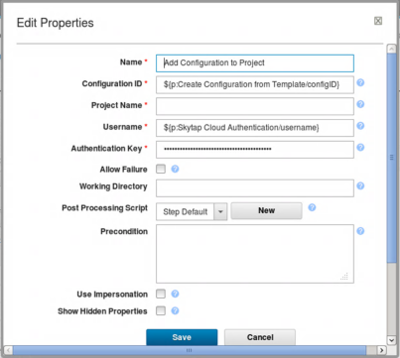
| Input property | Description |
|---|---|
| Configuration ID | The ID of the Kyndryl Cloud Uplift environment. The default value is the configID output property from the Create environment from template action step. |
| Project Name | The Kyndryl Cloud Uplift project name. If two or more Kyndryl Cloud Uplift projects have the same name (not recommended), the last matching project in the metadata project list is used. |
| Username | Your Kyndryl Cloud Uplift user name. The default value is Username from the Kyndryl Cloud Uplift authentication action step. |
| Authentication Key | Your Kyndryl Cloud Uplift API security token. The default value is password from the Kyndryl Cloud Uplift authentication action step. |
Add template to environment
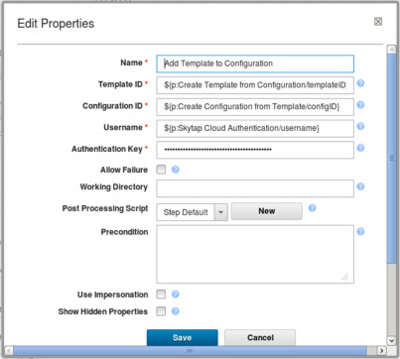
This step adds a VM from a template to an environment in Kyndryl Cloud Uplift.
| Input property | Description |
|---|---|
| Template ID | The ID of the Kyndryl Cloud Uplift template. To use a template created earlier, enter the templateID output property from the Create template from environment step. |
| Environment ID | The ID of the Kyndryl Cloud Uplift environment. The default value is the configID output property from the Create environment from template action step. |
| Username | Your Kyndryl Cloud Uplift user name. The default value is Username from the Kyndryl Cloud Uplift authentication action step. |
| Authentication Key | Your Kyndryl Cloud Uplift API security token. The default value is password from the Kyndryl Cloud Uplift authentication action step. |
Add template to project
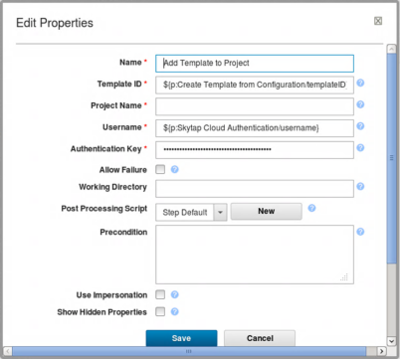
This step adds a Kyndryl Cloud Uplift template to a Kyndryl Cloud Uplift project.
| Input property | Description |
|---|---|
| Template ID | The ID of the Kyndryl Cloud Uplift environment. To use a template created earlier, enter the templateID output property from the Create template from environment step. |
| Project Name | The Kyndryl Cloud Uplift project name. If two or more Kyndryl Cloud Uplift projects have the same name (not recommended), the last matching project in the metadata project list is used. |
| Username | Your Kyndryl Cloud Uplift user name. The default value is Username from the Kyndryl Cloud Uplift authentication action step. |
| Authentication Key | Your Kyndryl Cloud Uplift API security token. The default value is password from the Kyndryl Cloud Uplift authentication action step. |
Change environment state
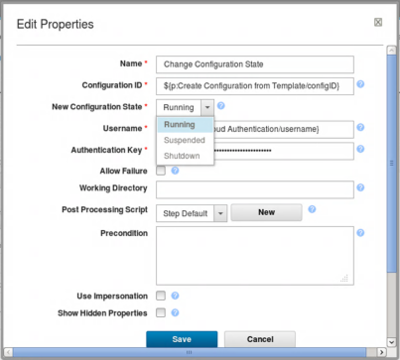
This action runs, suspends, or shuts down the environment.
| Input property | Description |
|---|---|
| Environment ID | The ID of the Kyndryl Cloud Uplift environment. The default value is the configID output property from the Create environment from template action step. |
| New Environment State | Running, Suspended, or Shutdown. For a description of these options, see Running and stopping VMs and environments. |
| Username | Your Kyndryl Cloud Uplift user name. The default value is Username from the Kyndryl Cloud Uplift authentication action step. |
| Authentication Key | Your Kyndryl Cloud Uplift API security token. The default value is password from the Kyndryl Cloud Uplift authentication action step. |
Connect to network in another configuration (ICNR)
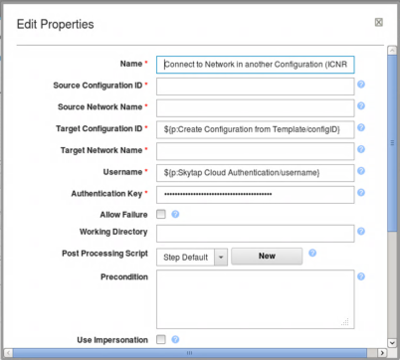
When actions connects the networks in two different Kyndryl Cloud Uplift environments. The network subnets in the two environments must already be configured to allow an ICNR connection to occur. For more information about ICNR, see Networking between environments.
| Input property | Description |
|---|---|
| Source Environment ID | The ID of the Kyndryl Cloud Uplift environment you want to connect. To use an environment created earlier, enter the configID output property from the Create environment from template action step. |
| Source Network Name | The name of the network in the source environment. If the environment has two or more networks with the same name (not recommended), the last matching network in the environment metadata is used. |
| Target Environment ID | The ID of the Kyndryl Cloud Uplift environment you want to connect to. The default value is the configID output property from the Create environment from template action step. |
| Target Network Name | The name of the network in the environment you want to connect to. This network must be configured to be visible to other networks. If the environment has two or more networks with the same name (not recommended), the last matching network in the environment metadata is used. |
| Username | Your Kyndryl Cloud Uplift user name. The default value is Username from the Kyndryl Cloud Uplift authentication action step. |
| Authentication Key | Your Kyndryl Cloud Uplift API security token. The default value is password from the Kyndryl Cloud Uplift authentication action step. |
Connect to VPN tunnel
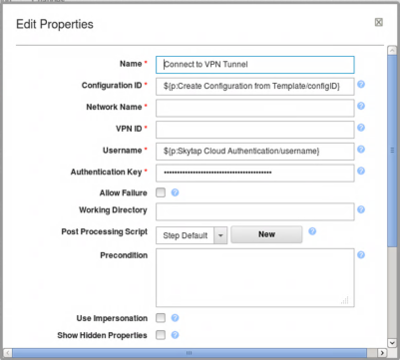
This step connects a network in an environment to a VPN in Kyndryl Cloud Uplift.
| Input property | Description |
|---|---|
| Environment ID | The ID of the Kyndryl Cloud Uplift environment you want to connect to the VPN. The default value is the configID output property from the Create environment from template action step. |
| Network Name | The name of the environment network you want to connect to the VPN. If the environment has two or more networks with the same name (not recommended), the last matching network in the environment metadata is used. |
| VPN ID | The ID of the Kyndryl Cloud Uplift you want to connect the environment to. |
| Username | Your Kyndryl Cloud Uplift user name. The default value is Username from the Kyndryl Cloud Uplift authentication action step. |
| Authentication Key | Your Kyndryl Cloud Uplift API security token. The default value is password from the Kyndryl Cloud Uplift authentication action step. |
Create environment from template
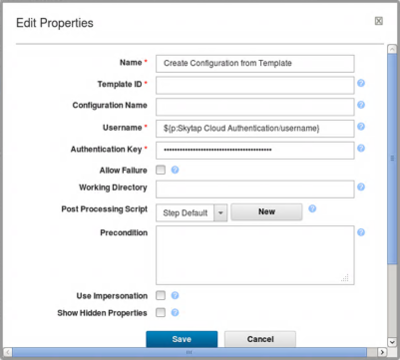
This steps creates a Kyndryl Cloud Uplift environment from a Kyndryl Cloud Uplift template.
| Input property | Description |
|---|---|
| Template ID | The ID of the Kyndryl Cloud Uplift template. To use a template created earlier, enter the templateID output property from the Create environment from template step. |
| Environment Name | Environment name |
| Username | Your Kyndryl Cloud Uplift user name. The default value is Username from the Kyndryl Cloud Uplift authentication action step. |
| Authentication Key | Your Kyndryl Cloud Uplift API security token. The default value is password from the Kyndryl Cloud Uplift authentication action step. |
| Output property | Description |
|---|---|
| configID | The ID of the Kyndryl Cloud Uplift environment. |
Create published service for VM
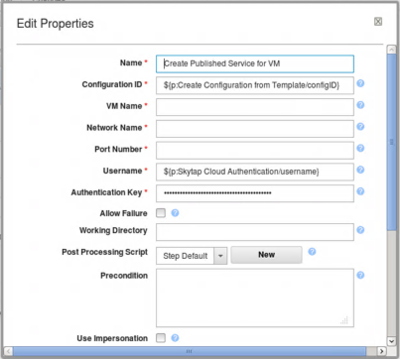
This step adds a published service to a VM in an environment. For more information, see Accessing VMs with published services.
| Input property | Description |
|---|---|
| Environment ID | The ID of the Kyndryl Cloud Uplift environment you want to connect to the VPN. The default value is the configID output property from the Create environment from template step. |
| VM Name | Name of the VM you want to attach the published service to. If the environment has two or more VMs with the same name (not recommended), the last matching VM in the environment metadata definition is used. |
| Network Name | The name of the network you want to attach the published service to. If the VM has two or more networks with the same name (not recommended), the last matching network in the environment metadata is used. |
| Port Number | The port number you want to create a published service for (3389, 22, etc.) |
| Username | Your Kyndryl Cloud Uplift user name. The default value is Username from the Kyndryl Cloud Uplift authentication step. |
| Authentication Key | Your Kyndryl Cloud Uplift API security token. The default value is password from the Kyndryl Cloud Uplift authentication step. |
| Output property | Description |
|---|---|
| serviceAddress | The text of the public URL and port in the format public-URL:port-number. |
Create published URL for environment
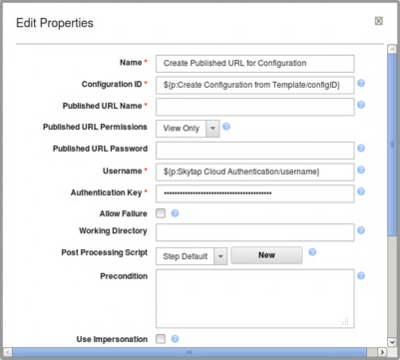
This step creates a Kyndryl Cloud Uplift sharing portal that can be used to share the environment. For more information, see Sharing VMs and environments with sharing portals.
| Input property | Description |
|---|---|
| Environment ID | The ID of the Kyndryl Cloud Uplift environment you want to share. The default value is the configID output property from the Create environment from template step. |
| Published URL Name | Name of the sharing portal. |
| Published URL Permissions | Sets the permission level for each VM in the environment. One of View Only, Use, or Full Control. For a description, see Sharing VMs and environments with sharing portals. |
| Published URL Password | Optional password used to restrict access to the sharing portal. |
| Username | Your Kyndryl Cloud Uplift user name. The default value is Username from the Kyndryl Cloud Uplift authentication step. |
| Authentication Key | Your Kyndryl Cloud Uplift API security token. The default value is password from the Kyndryl Cloud Uplift authentication step. |
| Output property | Description |
|---|---|
| publishedURL | The text of the sharing portal address |
Create template from environment
This step creates a new environment from a template in Kyndryl Cloud Uplift.
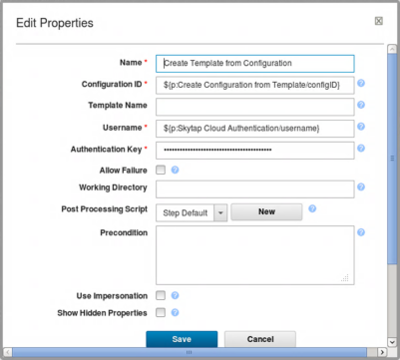
| Input property | Description |
|---|---|
| Environment ID | The ID of the Kyndryl Cloud Uplift environment. The default value is the configID output property from the Create environment from template step. |
| Template Name | Template name |
| Username | Your Kyndryl Cloud Uplift user name. The default value is Username from the Kyndryl Cloud Uplift authentication action step. |
| Authentication Key | Your Kyndryl Cloud Uplift API security token. The default value is password from the Kyndryl Cloud Uplift authentication action step. |
| Output property | Description |
|---|---|
| templateID | The ID of the template |
Delete environment
This step deletes an environment in Kyndryl Cloud Uplift.
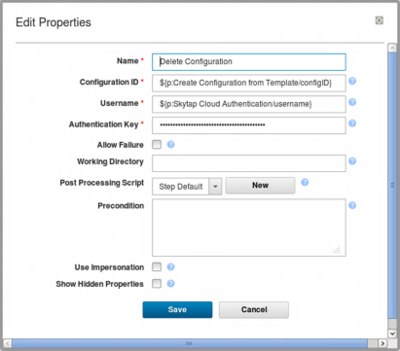
| Input property | Description |
|---|---|
| Environment ID | The ID of the Kyndryl Cloud Uplift environment. The default value is the configID output property from the Create environment from template step. |
| Username | Your Kyndryl Cloud Uplift user name. The default value is Username from the Kyndryl Cloud Uplift authentication action step. |
| Authentication Key | Your Kyndryl Cloud Uplift API security token. The default value is password from the Kyndryl Cloud Uplift authentication action step. |
Get VM ID
This step locates the ID of a VM in Kyndryl Cloud Uplift.
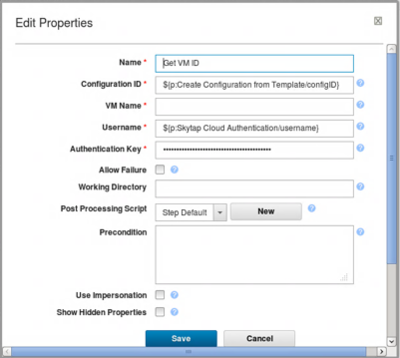
| Input property | Description |
|---|---|
| Environment ID | The ID of the Kyndryl Cloud Uplift environment. The default value is the configID output property from the Create environment from template step. |
| VM Name | Name of the VM you want to locate the ID of. If the environment has two or more VMs with the same name (not recommended), the last matching VM in the environment metadata definition is used. |
| Username | Your Kyndryl Cloud Uplift user name. The default value is Username from the Kyndryl Cloud Uplift authentication action step. |
| Authentication Key | Your Kyndryl Cloud Uplift API security token. The default value is password from the Kyndryl Cloud Uplift authentication action step. |
| Output property | Description |
|---|---|
| vmID | The ID of the VM |
List published service for VM
The step lists the published service on a VM in Kyndryl Cloud Uplift.
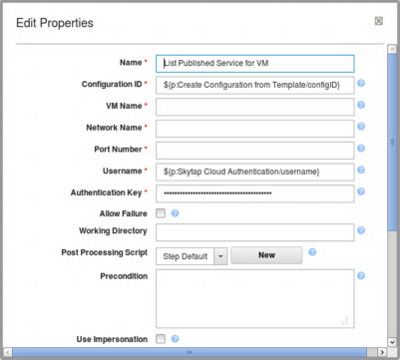
| Input property | Description |
|---|---|
| Environment ID | The ID of the Kyndryl Cloud Uplift environment. The default value is the configID output property from the Create environment from template step. |
| VM Name | Name of the VM the published service is attached to. If the environment has two or more VMs with the same name (not recommended), the last matching VM in the environment metadata definition is used. |
| Network Name | The name of the network the published service is attached to. If the VM has two or more networks with the same name (not recommended), the last matching network in the environment metadata is used. |
| Port Number | The port number the published service is using. |
| Username | Your Kyndryl Cloud Uplift user name. The default value is Username from the Kyndryl Cloud Uplift authentication action step. |
| Authentication Key | Your Kyndryl Cloud Uplift API security token. The default value is password from the Kyndryl Cloud Uplift authentication action step. |
| Output property | Description |
|---|---|
| serviceAddress | The text of the public URL and port in the format public-URL:port-number |
List published URL for configuration
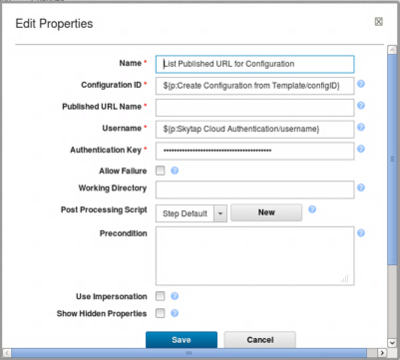
This step lists the sharing portal associated with an environment in Kyndryl Cloud Uplift. This step doesn’t list sharing portals for individual VMs in a environment.
| Input property | Description |
|---|---|
| Environment ID | The ID of the Kyndryl Cloud Uplift environment. The default value is the configID output property from the Create environment from template step. |
| Published URL Name | Name of the sharing portal. If the environment has two or more sharing portals with the same name (not recommended), the last matching sharing portal in the environment definition is used. |
| Username | Your Kyndryl Cloud Uplift user name. The default value is Username from the Kyndryl Cloud Uplift authentication action step. |
| Authentication Key | Your Kyndryl Cloud Uplift API security token. The default value is password from the Kyndryl Cloud Uplift authentication action step. |
| Output property | Description |
|---|---|
| publishedURL | The text of the sharing portal address |
Set VM metadata
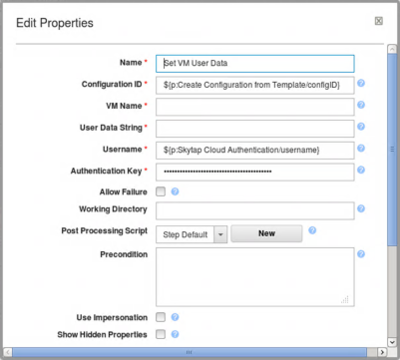
This step adds text to the VM metadata field for use in automation scenarios. For more information, see Accessing the VM metadata service.
Any previous text in this field is overwritten.
| Input property | Description |
|---|---|
| Environment ID | The ID of the Kyndryl Cloud Uplift environment. The default value is the configID output property from the Create environment from template step. |
| VM Name | Name of the VM the published service is attached to. If the environment has two or more VMs with the same name, the last matching VM in the Kyndryl Cloud Uplift environment metadata definition is used. |
| User Data String | The string value you want to place in the VM metadata field. |
| Username | Your Kyndryl Cloud Uplift user name. The default value is Username from the Kyndryl Cloud Uplift authentication action step. |
| Authentication Key | Your Kyndryl Cloud Uplift API security token. The default value is password from the Kyndryl Cloud Uplift authentication action step. |